
AJAX Introduction
What is AJAX?
AJAX stands for Asynchronous JavaScript And XML.
AJAX allows web pages to be updated asynchronously by exchanging data with a web server behind the scenes. This means that it is possible to update parts of a web page, without reloading the whole page.
AJAX is not a programming language, it just uses a combination of:
- A browser built-in XMLHttpRequest object (to request data from a web server)
- JavaScript and HTML DOM (to display or use the data)
AJAX is a misleading name. AJAX applications might use XML to transport data, but it is equally common to transport data as plain text or JSON text.
AJAX is a developer's dream, because you can:
- Update a web page without reloading the page
- Request data from a server - after the page has loaded
- Receive data from a server - after the page has loaded
- Send data to a server - in the background
AJAX Example
In every AJAX chapter, you can edit the examples online, and click on a button to view the result.
AJAX Example Explained
The HTML Page:
<!DOCTYPE html>
<html>
<body>
<div id="demo">
<h3>Let AJAX change this text</h3>
<button type="button" onclick="loadDoc()">Change Content</button>
</div>
</body>
</html>
The HTML page contains a <div> section and a <button>.
The <div> section is used to display information from a server, and the <button> calls a function (when it is clicked).
The loadDoc() function requests data from a web server and displays it:
The script:
function loadDoc() {
var xhttp = new XMLHttpRequest();
xhttp.onreadystatechange = function() {
if (this.readyState == 4 && this.status == 200) {
document.getElementById("demo").innerHTML = this.responseText;
}
};
xhttp.open("GET", "ajax_info.txt", true);
xhttp.send();
}
The "ajax_info.txt" file used in the example above, is a simple text file and looks like this:
The "ajax_info.txt" file:
<h1>AJAX</h1>
<p>AJAX is not a programming language.</p>
<p>AJAX is a
technique for accessing web servers from a web page.</p>
<p>AJAX stands for
Asynchronous JavaScript And XML.</p>
How AJAX Works
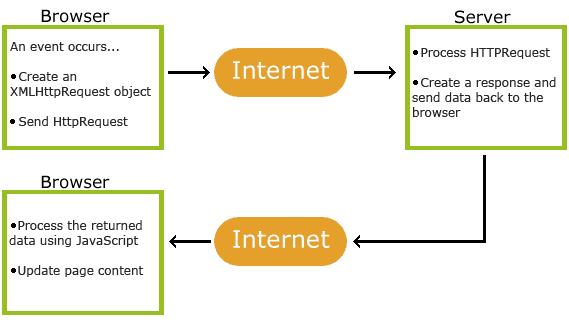
- 1. An event occurs in a web page (the page is loaded, a button is clicked)
- 2. An XMLHttpRequest object is created by JavaScript
- 3. The XMLHttpRequest object sends a request to a web server
- 4. The server processes the request
- 5. The server sends a response back to the web page
- 6. The response is read by JavaScript
- 7. Proper action (like page update) is performed by JavaScript